We have very high standards for data privacy and security.
To ensure that your data is always protected, we follow industry best practices.
Overview
All data is end-to-end encrypted where possible, except for minimal metadata such as timestamps and delete markers.
We ensure that our local machines, cloud environments, and other software used to distribute the platform are protected by hardware security keys.
We do not roll our own encryption. We rely on open source software and encryption algorithms that are well vetted:
- libsodium
- Password hashing: Argon2id (client-side), PBKDF2 (600,000 rounds)
- Secure random data generators: https://libsodium.gitbook.io/doc/generating_random_data
- Secret key authenticated encryption: XSalsa20-Poly1305 MAC
- Transport encryption: TLS v1.2
Access and Refresh Tokens:
- A JSON Web Key Set (JWKS) endpoint is available at https://account.api.topolock.com/.well-known/jwks.json
- Access tokens are signed with an elliptic curve EdDSA Ed25519 key pairs
- Access tokens are valid for a maximum of 15 minutes
- Refresh tokens are rotated every use (approximately every 15 minutes)
- Elliptic curve signing keys pairs are rotated every 6 months
What is End-to-End Encryption?
Read our blog post about end-to-end encryption.
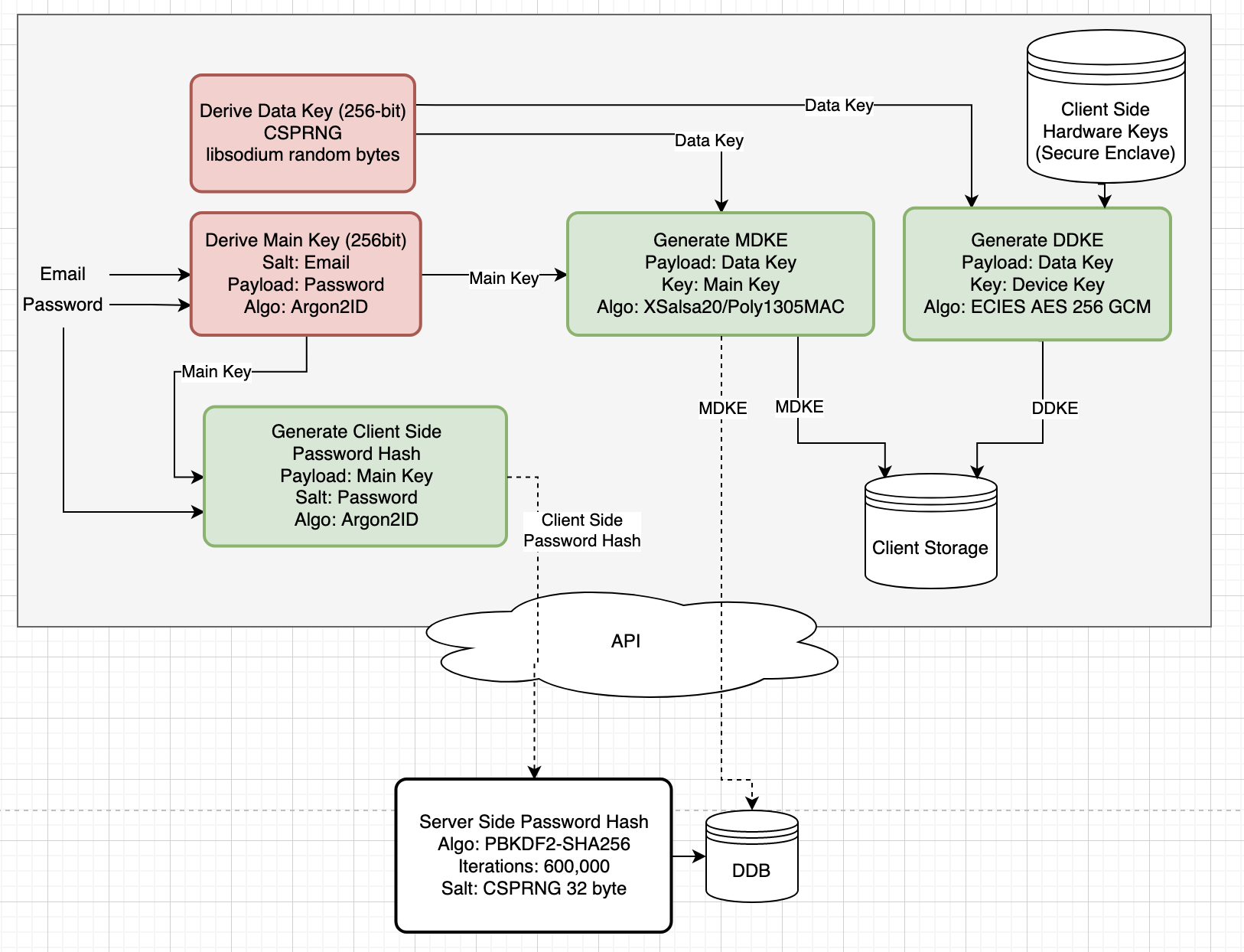
End to End Encryption Design:
| Item | Purpose |
|---|---|
| Data Key | Used to encrypt user data (pins, routes, notes, pictures, etc.). 256-bit encryption key derived from a CSPRNG. Never leaves client side device. In memory key only & never persisted to disk unless Auto Lock is disabled |
| Main Key | Used to encrypt the data key. 256-bit encryption key derived from email & password. In memory key only; never persisted to disk; never leaves client side. |
| Main Data Key Envelope | Encryption envelope around the data key encrypted by the main key. Persisted client and server side. Used for password login. |
| Device Data Key Envelope | Encryption envelope around the data key encrypted by hardware backed storage keys (Secure Enclave / iOS Keychain). Persisted client side only. Used for biometric login. |
| Client Side Password Hash | Argon2ID hash of the user’s main key performed client side before being transmitted over the network. Used for online login. |
| Server Side Password hash | PBKDF2 (600,000 rounds) hash of the client side password hash, performed server side. Used for online login. |
| Password & Hashing | The user’s plaintext password never leaves the user’s local device. The password is hashed twice; once client-side and once server-side. The client-side hash ensures the user’s password is never transmitted off of their local device. The server-side hash ensures that even with a server-side data breach the hash can’t be used to authenticate since the attacker won’t know the client-side hash. Also, the client-side hash and server-side hashing algorithms are different; client-side hash is performed by Argon2ID and server-side the hash is performed by PBKDF2 600,000 rounds. |
Auto Lock:
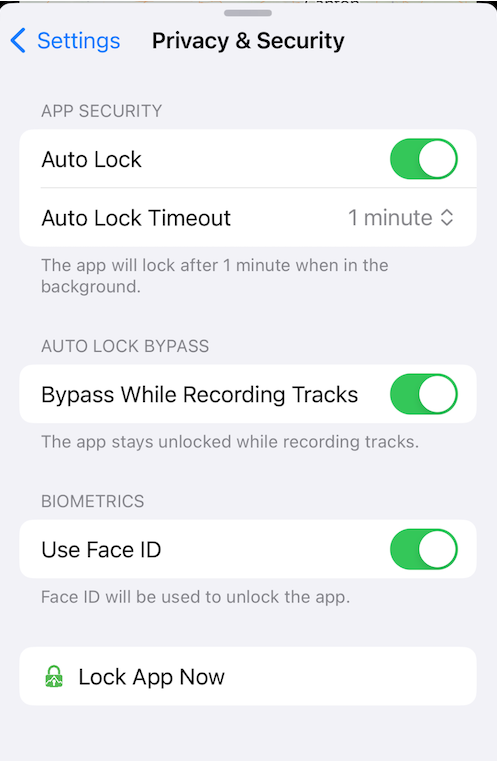
Auto Lock further protects your map data by only keeping a reference of your Data Key in-memory and locking the app after a specified amount of time.
- Auto Lock On:
- The Data Key is protected by the iOS Secure Enclave hardware module and biometrics.
- The app will lock after the time set or if the app is killed in the background.
- Auto Lock Off:
- The Data Key is protected by the iOS Keychain and stored with
kSecAttrAccessibleWhenPasscodeSetThisDeviceOnly. - The app will never lock, even if the app is terminated in the background.
- The Data Key is protected by the iOS Keychain and stored with
- Auto Lock Timeout: The time when the app will automatically lock in the background.
A screenshot of the Auto Lock settings on iOS:
Release Notes:
- v1.1.0 - Jun 22, 2024: Added information regarding App Lock.
- v1.0.0 - Oct 8, 2023: Initial E2EE design